FREE · PORTABLE · OPEN SOURCE
Free Auto Clicker for Windows
MagzClicker is a lightweight automatic mouse clicker for Windows. Choose the click interval, mouse button and click type, then start or stop it with a global hotkey.
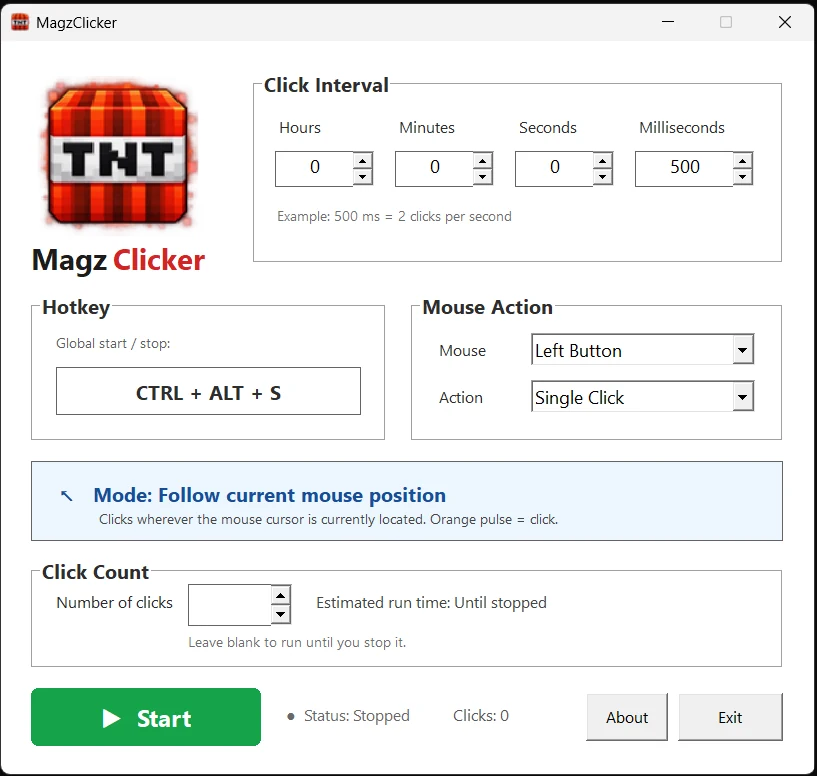
What is MagzClicker?
MagzClicker is a free auto clicker for Windows that automatically performs mouse clicks at the interval you choose. It follows your current cursor position, so you can move the mouse while the clicker is running instead of locking it to one screen coordinate.
The program is a portable Windows executable. There is no installer, no account and no telemetry in the application.
How to use the auto clicker
- Set the click interval. Choose how often MagzClicker should click.
- Choose the mouse action. Select left, right or middle button and single or double click.
- Choose a click limit if needed. Leave it unlimited or enter a fixed number of clicks.
- Start the clicker. Press Start or use Ctrl + Alt + S.
- Move your cursor. MagzClicker continues clicking wherever your mouse pointer is located.
Why use a portable auto clicker?
A portable auto clicker is useful when you want a small Windows utility without installing extra software. MagzClicker can be launched directly from the downloaded EXE and removed simply by deleting the file.
It is intended for repetitive mouse-clicking tasks where you decide when and where clicks should occur. Always make sure automated clicking is permitted by the software, website or game you are using.
Frequently asked questions
Is MagzClicker free?
Yes. MagzClicker is free and open source under the MIT License.
Does MagzClicker need to be installed?
No. MagzClicker is distributed as a portable Windows EXE and does not require an installer.
Can MagzClicker double-click automatically?
Yes. You can choose single click or double click and select the left, right or middle mouse button.
Can I start and stop the auto clicker with a keyboard shortcut?
Yes. MagzClicker includes the global hotkey Ctrl + Alt + S.
Does MagzClicker collect data?
No. The application contains no telemetry, analytics, advertising or background network communication. See the privacy policy for details.
Download MagzClicker for Windows
The latest official executable is downloaded directly from GitHub Releases.